Authoring
LunCoSim has two USD authoring surfaces and one document model behind both. Build composes the live world from assemblies and entities. Editor opens one explicit USD document and edits its internals. Neither surface writes text behind the document's back.
Build and Editor
| Perspective | Scope | Use it for |
|---|---|---|
| Build | The composed live scene | Placing assemblies, moving objects, environment settings, spawn catalog |
| Editor | One explicit USD document | Reusable assembly internals, prim hierarchy, materials, authored properties |
Build edits the live scene, so the simulation keeps running while you work. It is the right place to compose a world from existing assets and to adjust placement. Editor opens a file as an editing preview; it does not replace the running scene.
The split matters because a composed scene and a reusable asset are different authoring problems. A change to the practice yard's rover placement belongs to the yard. A change to the rover's wheel mount belongs to the rover asset, where every instance sees it.
The document model
Every edit is a typed operation on a UsdDocument:
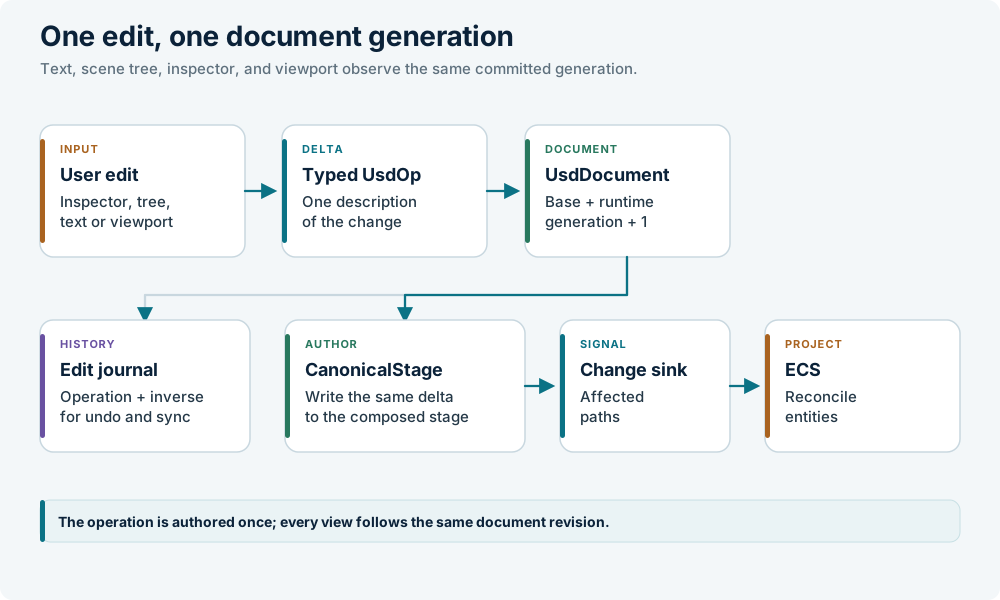
The operation is the single description of the delta. Views do not re-derive it by reading state back. This is the author-once coherence invariant: the text editor, the scene tree, the property inspector, and the 3D viewport all observe the same document generation.
The current operation set includes:
| Operation | Effect |
|---|---|
ReplaceSource |
Replace a whole layer's text |
AddPrim |
Add a prim, optionally with a reference |
RemovePrim / RestorePrim |
Remove or restore a subtree |
MovePrim |
Rename or reparent |
SetTranslate / SetRotate |
Set a transform |
SetAttribute / RemoveAttribute |
Author or remove a property |
MoveProperty / CopyProperty |
Rename or copy a property spec |
SetRelationship |
Set a relationship target list |
SetConnection |
Author a dataflow edge |
SetTimeSample / RemoveTimeSample |
Author animation |
Programmatic and UI edits go through ApplyUsdOp or ApplyUsdOps. Both return
a generation acknowledgement. Direct source mutation is out.
Multi-op intents use one change set. AttachProgram is the typed source-backed
program authoring intent; it lowers its complete source, port, and wire
contract to the same USD operation path.
Layers and save semantics
The document has three layers:
- base — saved to the source file;
- runtime — durable edits kept out of the source file;
- view — disposable derived presentation.
Saving the document publishes the exported base bytes to the document's existing asset identity before acknowledging success. Later reference composition therefore sees the same bytes that are on disk.
The runtime layer is persisted only when the Twin opts in with
usd.runtime_persistence = true. The view layer is never saved, journaled, or
included in the sidecar. Route ribbons and visited-marker colors disappear when
the document closes.
Undo and redo are journal operations. Removing a prim captures only its authored SDF subtree and the owning parent's sibling order, so undo does not serialize the entire layer. Sibling order merges against the current parent list, retaining unrelated later children.
The Editor workflow
- Choose a USD file in Twin, or use File → Open. The file opens as an editing preview.
- Select a prim in Prims or click it in the preview. Inspector shows its properties.
- Edit in the Inspector, or switch between Visual and Text.
- Use the viewport transform gizmo for placement. Left-drag pans, right-drag orbits, the wheel zooms.
- Review the journal in Change History. Save and Undo apply to the active document, not to the live scene.
To find a prim's file in the Twin browser, right-click the prim and choose Reveal in Twin.
The text panel borrows a generation-matched authored or composed snapshot. It does not create a preview-state transition, and painting it must not wake render-layer reconciliation. Text-layer and mode changes use typed intents.
Assembly authoring
The reusable assembly_edit tool owns explicit-document USD editing. Its
operations include:
add_prim,transform,attribute,schema,variant,relationship,connection, andbatch;attach_componentanddetach_component;attach_program;rigid_body_plan,revolute_joint_plan,program_input_*, andprogram_outputconstructors.
The higher-level assembly_builder tool provides semantic frame and shape
construction, placement, geometry, retrofit-body, reference-target, and
alignment plans. Both are policy wrappers over the journaled command surface.
USD remains the scene and topology authority; Modelica remains the equation and
graph authority.
The normal sequence is:
let context = model_authoring::model_context(doc, root, "@root@");
let ready = model_authoring::readiness_report(doc, root, "@root@", policy);
let recipe = model_authoring::scene_recipe(doc, "@root@", scene, context.generation);
let graph = model_authoring::port_graph(doc, root, "@root@");
let wires = model_authoring::wiring_plan(
    doc, "@root@", root, connections, context.generation);
model_context is one composed, path-addressed read: children, references,
variants, component and frame facts, bodies, joints, colliders, ports,
generation, and available actions. readiness_report returns stable checks for
topology, physicality, mounts, connections, controls, and runtime evidence. An
omitted check is not_requested; it is not an implicit pass.
After review, apply the operations through assembly_edit::batch or the normal
proposal/review/commit flow, then re-read the new generation. Do not write USDA
text directly.
References and variants
Use references for reusable assets. A reference composes the asset's prim tree under the instance; an override changes only the opinions that differ.
def Xform "RoverA" (
    prepend references = @lunco://vessels/rovers/skid_rover.usda@
)
{
    double3 xformOp:translate = (0, 0, 0)
    uniform token[] xformOpOrder = ["xformOp:translate"]
}
Use variants for authored alternatives, not for runtime state. A variant selection is an authored opinion and enters the journal.
Programs and ports
AttachProgram authors a LunCoProgramAPI child, declared scalar ports,
defaults, and connections as one change set. The program is a child prim, so
deleting the owner deletes the behavior.
A model output becomes externally connectable only when the component prim
declares the matching outputs:<name> property. Declare every value another
component consumes, then verify that the generated network exposes it and the
composed source connection resolves to it.
See Programs and Ports and connections.
Validation while authoring
The lightest useful checks are:
| Question | Tool |
|---|---|
| Does the document parse and compose? | ValidateAsset, luncosim --validate |
| Is the loaded scene structurally sound? | RunLint { scope: "scene" } |
| Does the Twin resolve its names and assets? | ValidateTwin |
| Does the behavior meet its verdict? | luncosim test --scene |
A clean parse does not prove a clean run. Keep the evidence with the project. See Validation.
External tools
USD is an interchange format. Blender, Omniverse, USDView, and other tools can
open the same files. LunCoSim-specific facts live in standard schemas where
possible and in lunco: properties where the engine needs them.
A round trip through an external tool must preserve the standard schemas and
relationships. If a tool drops a lunco: property, the scene may still render
but lose a behavior. Keep a validation step after any external edit.
Rules of thumb
- Use Build for placement, Editor for asset internals.
- Author one typed operation at a time; let the journal record it.
- Save through the document, not by rewriting text.
- Keep durable edits in the runtime layer only when they should not touch the source file.
- Treat the view layer as disposable.
- Re-read the document generation after a batch of edits.
- Validate before sharing a Twin.
The reference chapter documents the exact command-line and file-format contracts: Reference.