Integrate your stack
LunCoSim is designed to sit beside existing tools, not replace them. The integration boundary is made of two things:
- Authored files in a Twin: USD, Modelica, Rhai, SysML, and the TOML manifests.
- A typed runtime surface of commands and queries, available to Rhai and over HTTP.
That boundary is deliberately narrow. A scene graph, a solver, a mission script, and an operator console keep their own owners instead of being copied into a second integration layer.
What you can keep
| Existing stack | What you keep | What changes | Status |
|---|---|---|---|
| USD scenes and assets | Geometry, materials, physics schemas, typed ports, composition | Reference through lunco:// or twin://; no second scene graph |
Available |
| glTF mesh or scene | The .gltf or .glb asset and its materials |
Reference it from a USD payload or reference; choose scene or mesh mode | Available |
| Modelica source | .mo classes and package structure |
Declare a Twin source root; recompile after edits | Available; see the package note below |
| FMI 3.0 Co-Simulation FMU | The binary FMU | Load with LoadFmu; expose scalar Float64 ports |
Native import only |
| ROS 2 nodes and topics | Your ROS 2 graph | Add a sidecar that translates ROS 2 traffic to the HTTP API | No bridge shipped |
| URDF, SDF, or MJCF robot | The source robot description | Convert it to USD first | No direct importer |
| Python, C++, or Julia tools | Your process and libraries | Call the HTTP command/query API | HTTP only; no SDK |
| YAMCS, Open MCT, or Grafana | Your operator tool | Add an adapter that reads telemetry and sends commands | No bundled adapter |
| SysML v2 requirements | .sysml and .kerml source |
Mount a Twin source set and map verification cases | Bounded support |
| Rhai mission logic | Scenario intent and event policy | Use LunCoSim's Rhai surface and typed commands | Native |
A missing adapter is not a missing runtime capability. The command and query surface is available today; an adapter is a small external process that speaks your protocol on one side and the documented HTTP envelope on the other.
The integration boundary
Use the same path as the UI and the authored tests:
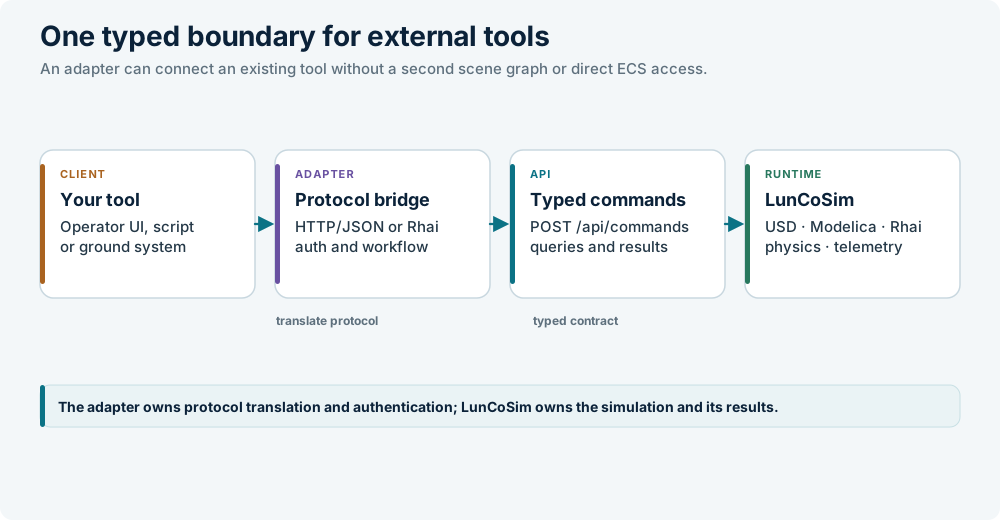
The HTTP envelope is documented in HTTP API. The JSON is an external wire format only; inside the application, values cross through typed contracts. Do not build a sidecar that parses internal structures or writes domain state behind the owning document.
For live control, use ClaimControl/ReleaseControlClaim for authority and
SetPorts/ReleasePort for input holds. See
Mission control.
Modelica packages
Keep the package structure and its within declarations. Add the package
directory to the Twin manifest:
[modelica]
paths = ["models"]
externals = [
  { name = "BundledModelicaLibraries", path = "@bundled:source-bundle" },
]
paths tells the compiler where the source roots are. externals adds a
library outside the Twin. Use @bundled:source-bundle for the installed
Modelica source bundle.
Opening a single package.mo does not recursively import every .mo file in
its folder. For a multi-file package, open the directory as a workspace or Twin
root and declare it in [modelica].paths. In the browser build, a single-file
pick remains a single document; the current package-loading limitation is
tracked in issue #49.
FMI
Native FMI 3 Co-Simulation import is available on desktop builds through
LoadFmu. It is an explicit Co-Simulation profile with these limits:
- FMI 3.0 Co-Simulation only; FMI 2 and Model Exchange are not accepted.
- Unclocked scalar
Float64input and output ports only. Arrays, other port types, Scheduled Execution clocks, and external execution tools are rejected. - Fixed internal FMU steps must divide the admitted communication interval.
- Inputs are held across each communication interval. Implicit master iteration is not implemented.
- A native initialization failure is terminal and stops shared simulation advancement; it is not retried silently.
The browser build cannot load native FMU binaries and does not register
LoadFmu. FMU export and SSP packaging are not shipped.
Do not confuse "the port fabric follows FMI/SSP vocabulary" with "every model is an FMU." The internal Modelica backend is not a packaged FMU. A reference FMU can be run beside it through the native import path.
ROS 2 and robot descriptions
There is no ROS 2 bridge in the shipped runtime. Issue #57 tracks the request. A ROS 2 integration therefore has the same shape as any other operator adapter:
- Keep the ROS 2 graph outside LunCoSim.
- Translate its command topics or services into
ClaimControlandSetPorts. - Translate port reads or telemetry into ROS 2 publications.
- Release the claim and input holds when the ROS 2 session disconnects.
LunCoSim does not import URDF, SDF, or MJCF directly. Convert the robot to USD, preserve the authored joint and collider structure, and validate the result before wiring behavior. A converter load test is backlog work, not a supported importer.
glTF is the supported path for mesh content from a content tool. Export the
model as .gltf or .glb, reference it from a USD payload or reference, and
keep the USD prim as the scene identity. See
Addresses and assets.
A practical adoption path
- Put the project in a Twin. Add
twin.toml, the default USD scene, the Modelica roots, and the Rhai scenarios. See Create a Twin and twin.toml. - Keep USD as the scene fact. Ports and wires are authored
inputs:andoutputs:properties. Do not add a parallel configuration file for the same facts. - Put continuous behavior in Modelica. Keep mission sequencing and operator policy in Rhai.
- Add an authored acceptance test. A scene test is the production behavior gate. See Validation.
- Connect the external surface. Use the HTTP API for a process, a test
driver, or an operator adapter. Use
ClaimControlfor authority andSetPortsfor a live input hold. - Compare against a reference. A passing test proves the authored contract; it does not prove physical accuracy for your mission. Record the reference data, tolerances, solver settings, and build version.
What not to do
- Do not expose the command API directly to an untrusted network. It is loopback-only and executes powerful commands.
- Do not treat
SetPortsas permanent wiring. It is a live input hold; released inputs return to their authored source. - Do not edit authored USD text from a sidecar. Use the document tools or the typed operations so identity, undo, and journaling stay coherent.
- Do not create a second scene graph in the adapter. The composed USD stage is the scene fact.
- Do not claim ROS 2, URDF, FMU export, or a ground-system adapter works until the adapter exists and its own test passes.
Related sections
- HTTP API — request envelope and discovery
- Mission control — authority, telemetry, and operator lifecycle
- Validation — preflight, scene tests, and evidence
- Modelica — source roots and cosimulation
- Formats — the authored layers