Runtime UI
LunCoSim has a small runtime-authored presentation layer for HUDs, telemetry
cards, progress overlays, and other Twin-facing surfaces. It looks like HTML and
CSS, but it is not a browser. Templates become retained Bevy UI entities, and
styles become Bevy Node and visual components through bevy_hui and
bevy_flair.
The design goal is a fast, reloadable interface boundary that native and web-facing presentation can share without moving simulation authority into markup. A surface may read a named engine capability and emit a semantic action. It cannot inspect ECS state or directly mutate the simulation.
The committed dependency baseline is bevy_hui 0.8.0, bevy_flair 0.9.0, and
Bevy 0.20.0. Keep Cargo.lock as the version evidence and re-check upstream
release notes before changing the contract.
The boundary
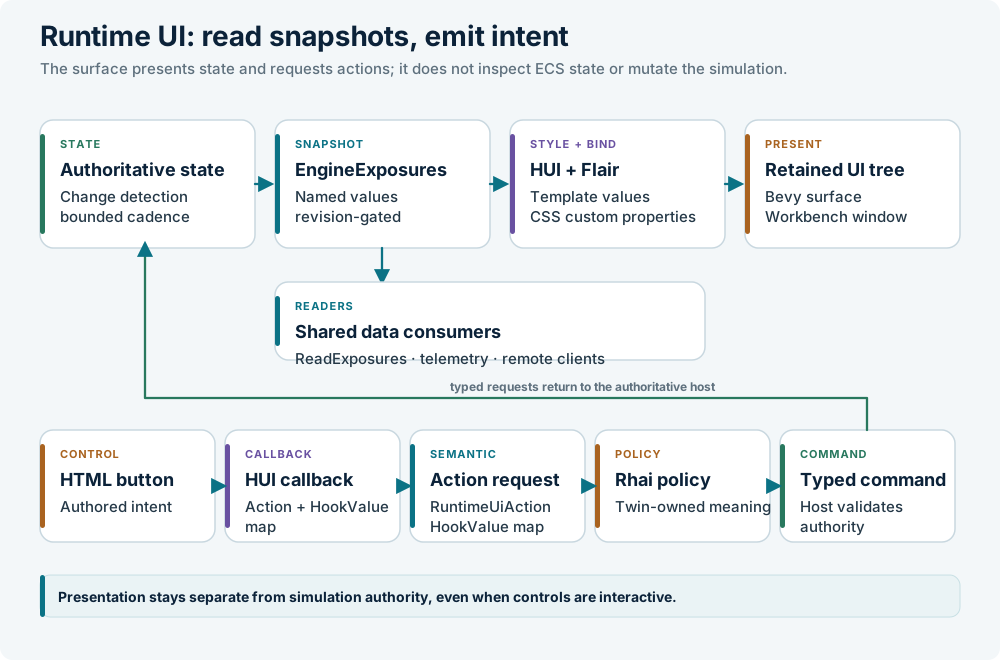
Each layer owns one concern:
| Layer | Owns | Does not own |
|---|---|---|
| Engine/domain producer | Authoritative values, sampling, visibility, capability names | HTML ids, CSS, layout, widget-specific code |
EngineExposures |
Typed named snapshots and change revision | Renderer or presentation policy |
runtime_surfaces.json |
Surface registration, bindings, gates, actions, modal/input policy, placement | Simulation state, subject selection, visibility policy |
Active Twin LunCoPolicy / Rhai |
Subject visibility, scalar presentation, recording selection | Retained tree, simulation authority, renderer details |
.html template |
Retained tree shape, declared properties, callback names | ECS queries, domain commands, CSS layout |
.css stylesheet |
Appearance, internal layout, transitions, custom-property mapping | Engine state and command dispatch |
| Workbench / egui | Shell, editors, complex panels, docking tree | Runtime surface content |
The generic exposure namespace is the contract. Do not add a special
domain_to_view path or a Rust producer for one particular template. Ports,
telemetry, physics, scripts, and derived capabilities all publish through the
same registry.
Manifest and lifecycle
A scope admits one typed lunco.runtime-ui-manifest.v1 document. The
application manifest supplies shared surfaces; the active Twin's manifest
replaces matching surface IDs and adds new ones. Duplicate IDs or namespaces
within a composed manifest, duplicate manifests in one scope, and invalid
contracts produce a structured runtime fault.
Template, stylesheet, and collection-template paths are relative to that scope's
asset root. The owner qualifies them with the exact lunco:// or twin://
authority before publishing the retained tree. Explicit logical URIs are also
accepted, so a Twin stylesheet can import shared fonts:
The manifest cache belongs to open source scopes. Scene teardown retires the
resolved presentation and republishes it even while paused. Exact TwinClosed
identity removes that Twin's source; late snapshots from a retired Twin are
rejected. Replacing the active Twin rebuilds the retained surface roots from the
current composition and restores application surfaces where no override exists.
Rhai still owns exposure contents, visibility, and action meaning. Rust owns
source admission, validated composition, and retained-tree lifecycle.
The headless and server compositions do not link the runtime UI or its file watcher.
Register a surface
Every surface needs a stable id, template, stylesheet, namespace, and
placement:
{
  "id": "mission-status",
  "template": "ui/status.html",
  "stylesheet": "ui/status.css",
  "namespace": "mission-status",
  "bindings": {
    "title": { "source": "title" },
    "state": { "source": "state" }
  },
  "actions": [
    { "callback": "runtime_status_focus_moon", "action": "view.body.moon" }
  ],
  "visible_in_perspective": "sandbox_view",
  "interactive": true,
  "placement": {
    "mode": "window",
    "anchor": "top_right",
    "offset": [-16.0, 16.0],
    "width": 260.0,
    "height": 84.0
  }
}
| Field | Meaning |
|---|---|
id |
Stable manifest identity; unique within the manifest |
template, stylesheet |
Asset paths under the normal Bevy asset root |
namespace |
Exact key in EngineExposures; use a capability name, not a widget name |
bindings |
Optional map from template property to exposure property. A map translates exact rendered values. css: true projects a binding into a CSS custom property |
collections |
Optional keyed row collections; see below |
actions |
Maps a unique HUI callback to a built-in semantic action or a Twin-authored action identifier |
visible_in_perspective |
Optional workbench perspective id or array of 1–32 distinct nonempty ids; omission means unrestricted |
gate |
Optional named host gate. Unknown gates are closed |
setting |
Optional namespaced boolean in the active Twin's [settings] table; false hides the surface |
setting_default |
Value used when setting is absent, including when no Twin is active |
interactive |
Enables input ownership for authored controls carrying HUI on_press |
modal |
Requires an interactive viewport surface and makes its visible root claim the full-window scene-pick gate |
dismiss_action |
Optional authored semantic action emitted by Escape while the surface is visible |
draggable |
Allows a window surface root to move with primary-button dragging |
placement |
The outer rectangle and its relationship to the workbench |
The loader rejects unknown fields, duplicate surface IDs or namespaces,
duplicate callbacks, unsafe relative paths, empty contract names, and
non-finite or non-positive window geometry before any surface is mounted. A
modal surface must be interactive and use viewport placement.
The manifest remains the default geometry and visibility authority. Dragging a
window surface stores only a validated logical top-left override in the active
Twin's workspace state. Overrides are pruned when a manifest no longer authors
their stable surface ID, clamped after a resize or DPI change, and cleared when
the Twin closes. A double click on the drag handle restores the authored anchor.
Templates
The stable runtime contract uses a deliberately small HUI vocabulary:
<template>
  <property name="title">Status</property>
  <property name="state">offline</property>

  <node id="status-root">
    <text id="status-title">{title}</text>
    <text id="status-state">{state}</text>
    <button id="status-pause" on_press="runtime_status_pause">
      <text>Pause</text>
    </button>
  </node>
</template>
Rules that matter:
- Use
<template>,<property>,<node>,<text>,<button>, and standard<input type="text|number">. - Every template, including a keyed collection row, must have exactly one
<node>root. - Put buttons and text elements beneath that root. A leaf element at the root can panic when HUI reapplies its type during reload.
- A button's visible caption must be a nested
<text>node. Raw text directly under<button>can render as an empty control. - Use stable
idvalues and#idselectors. - HUI 0.8 does not turn an HTML
classattribute into aClassList; it parses the attribute as an unknown style property and rejects the template. Use ids. - A property declaration needs a nonempty initial text value to register. The producer may later project an empty string; an empty declaration is omitted by the parser and cannot receive a binding.
on_press is the stable callback. on_enter, on_exit, on_spawn, and
on_change remain available for a tested surface-specific need, but they are
not part of the shared convention.
For dynamic controls, use the project convention:
<button id="status-action"
        on_press="runtime_ui_authored_action"
        tag:action="{action}">
  <text>{label}</text>
</button>
The action tag is a dynamic scalar property supplied by the exposure or Rhai
policy. The typed event resolves it from the pressed node. Other tag:* values
form a typed HookValue map on the event. The runtime transports the map without
concatenating it into the action name; Rhai owns its interpretation.
There is no DOM query, JavaScript execution, direct resource mutation, or widget-specific Rust callback in an authored template.
Text and number inputs
Standard authored <input type="text"> and <input type="number"> map to
Bevy's editable text widget. Inputs support pointer focus, caret and selection
editing, character limits, numeric character filtering, and authored tab order.
Put tag:ui_form and tag:ui_field on the element. Values are strings until
the Twin's Rhai policy validates them. This is a deliberately small native form
contract: browser placeholder behavior, sliders, selects, automatic validation
messages, and form submission are not provided. Simple authored viewport modals
use the generic modal and dismiss_action fields; rich source editing and
dialogs remain owned by the egui workbench.
Keyed collections
Declare a collection with its exposure source, HTML container id, row-template
asset, and stable record key:
"collections": [
  {
    "source": "programs",
    "container": "program-list",
    "template": "ui/program_browser_row.html",
    "key": "key"
  }
]
The row template is ordinary authored HUI markup with a single <node> root.
Its scalar properties can populate text, ids, and tag:* action or input
attributes. The runtime keeps one retained row per stable key, updates changed
template properties in place, removes retired keys, and orders children to match
the published array.
Engine-owned lists use their normal EngineExposures producer. Twin Rhai
policies can publish UI-owned rows with SetRuntimeUiCollectionData, which
accepts an ordered array of string maps. The command requires an active Twin,
checks the namespace and source against the active authored manifest or the
mounted surface, rejects missing or duplicate keys, and bounds row, field, and
payload sizes. Validation uses the manifest declaration before HUI mounts the
surface, so startup scripts can publish initial rows without racing
presentation creation.
Publications are removed when the owner Twin closes or another Twin takes ownership. Application code, Rhai policy, and HTML templates therefore share one generic collection path without giving scripts direct resource access.
A collection may list scalar row fields in css, for example
"css": ["details_display"]. Those fields keep their ordinary template values
and also publish inherited --ui-details-display custom properties on that row.
An optional scrollbar names the retained scrollbar container. Undeclared row
text never enters CSS.
Styling
Flair is CSS-like and maps properties to Bevy UI components. The practical subset includes:
display, flex layout, supported grid layout, absolute positioning, dimensions,margin,padding, and gaps;- borders, radii, backgrounds, colours, opacity, z-order, and transforms;
- text size, weight, colour, alignment, and inherited font properties;
#id, type, class, descendant and child selectors, state selectors such as:hoverand:active,@import, custom properties,var(...), transitions, and keyframe animations.
Keep the outer rectangle in the manifest and use CSS for the contents of that
rectangle. For a value that changes at runtime, expose a property and consume
its explicitly selected --ui-<property-name> custom property:
The bridge projects bound values to HUI template properties. A binding with
css: true additionally writes a CSS variable named --ui-<property-name>
(underscores become hyphens). Text-only bindings and implicit same-name bindings
never enter the CSS token stream. Mapping values can themselves be CSS values,
for example var(--accent-color).
The runtime retains HUI's compiler style context outside its active style
system. Flair remains the only rendered style owner. Do not write Bevy Node,
BackgroundColor, TextColor, or HUI style components from Rust under a
runtime surface; HUI and Flair will overwrite them.
The manifest owns the outer rectangle. HUI replaces a template root's Node
while building, so placement is applied after HUI and Flair finish their
authoritative style work. The runtime pins the root's minimum and maximum size
to the resolved rectangle and clips child overflow at that boundary. Authored
profiles must fit their contents within the registered size. The correction is
change-detected for the initial build, an actual resize, or a style rebuild, not
a per-frame placement loop. During startup, a zero-sized target is ignored until
the primary window has valid dimensions.
Use the bundled theme and font stylesheets described in Theming. A hardcoded dark palette will not follow Light mode.
Actions and Rhai
A surface callback receives only the pressed entity. The manifest turns it into
a RuntimeUiAction. Built-in actions remain in the host; any other identifier
becomes a typed runtime.ui.action event for Rhai policy.
fn on_event(me, evt, ctx) {
    if evt.name != "runtime.ui.action" { return; }
    if evt.value.action == "mission.pause" {
        pause();
    }
}
Authored semantic actions are intentionally open-ended. Their meaning belongs to
the active Twin's Rhai program, not to the runtime UI crate. A dismiss_action
follows the same path when the user presses Escape over a visible modal or
non-modal surface.
The camera-status surface is the reference composition for a typed option list.
Rust publishes the full current camera fact and a compact identity projection
through the generic camera-status exposure. Rhai adds a typed option array and
authored dimensions to that snapshot. The manifest declares only the option
field names and the trigger action. The shared egui renderer reads the generic
records and forwards the selected authored action as a typed
runtime.ui.action event. The runtime UI crate knows no camera names, camera
commands, or camera-selection rules.
Action sets from guided HUD cards carry a ToolHookBinding entity lease. The
shared tool queue checks that lease, the immutable endpoint, the registered tool
scope, the active Twin, and the scene generation before admitting and executing
work.
Exposures and readiness
An engine producer resolves authoritative state and writes generic values:
let mut ui = exposures.writer("mission-status");
ui.visible(has_mission);
ui.property("title", mission_title);
ui.property("state", state_label);
ui.property("state_color", "var(--ok-color)");
The producer should be scheduled with the engine and protected by Bevy change
detection or a producer-owned fingerprint. Continuous inputs are coalesced to
the bounded exposure cadence (EXPOSURE_UPDATE_HZ, currently 20 Hz). Discrete
lifecycle facts should use an event observer. Equal snapshots retain their
published view; advancing a caller's time sample or sequence alone does not
rerun a projection. Clocked animation belongs to the presentation owner.
EngineExposures.revision advances only when a complete surface changes,
including its preparation state, or is retired. It is not a frame counter.
A surface's state is pending, ready, or failed:
| State | Meaning |
|---|---|
pending |
New or replaced identity; hidden with no properties |
ready |
Validated visibility and properties are published |
failed |
Invalid policy result; terminal until the source or identity changes |
Existing ready samples remain available during continuous refresh. A failed policy publishes an error and no partial view; inspect it instead of repeatedly waiting. Hidden surfaces have no retained tree.
Subject-scoped surfaces are discovered from composed USD. A prim opts in with
lunco:ui:surfaceId; lunco:ui:visibilityMode supplies possessed or always
for the built-in Rhai policy. Keep these fields on a prim with
LunCoUiSchemaAPI. The surface ID is the exposure namespace; Rust does not
construct names from model classes, slots, or vehicle counts. Live edits
invalidate authored-surface discovery at the USD stage-revision boundary without
recreating the prim subtree or resetting simulation state below the same scene
scope.
The single runtime.ui.surface hook returns
#{ visible: bool, properties: map } for one captured fact snapshot. Both fields
are validated before the surface is published. There is one backend fact
conversion and one hook call per admitted surface snapshot.
Runtime surface facts expose a subject's retained SimulationObjectPaused as
pause: #{condition, detail}, or unit when the subject is running. This is a
typed snapshot of the co-simulation owner state, invalidated when the marker
changes. Rhai chooses the wording; it must not infer a paused state from a
transient model output.
Preparation holds also publish typed facts. The vessel status can show
WAITING FOR TERRAIN while required ground is held, including while a download
awaits user action. The built-in Rhai visibility policy can temporarily show an
authored surface during scene, terrain, script, or Modelica preparation. Once
preparation clears, the authored possessed or always mode controls
visibility again; neither Rust nor the template adds a second visibility rule.
Inspect a running surface over the API:
curl -s -X POST http://127.0.0.1:4101/api/commands \
  -H 'content-type: application/json' \
  -d '{"type":"ExecuteCommand","command":"ReadExposures",
       "params":{"surface":"mission-status"}}'
The response contains revision and each surface's state, error, visible,
and typed properties. Wait for ready before reading prepared properties, and
retain your view while the revision is unchanged.
Visibility and placement
A surface is mounted only when all applicable gates agree:
- The exposure's
visiblevalue is true. - If
visible_in_perspectiveis authored, the active perspective is in the list. - If
gateis authored, the named host gate is open. Unknown gates are closed. - If
settingis authored, the active Twin's boolean is true. An absent key usessetting_default.
The perspective filter gates interactive rendering and capture readiness, not just paint. Omission means unrestricted.
The three placement modes are:
| Mode | Use |
|---|---|
viewport |
Full-window overlay, useful for HUDs that frame the 3D scene |
dock_panel |
Surface aligned to a workbench panel, using its authoritative PanelRects rectangle and an optional logical-point inset |
window |
Fixed logical-point rectangle anchored at a window corner or center, with an offset and explicit width and height |
Set interactive: true only when the surface contains controls that should own
pointer input. A control becomes an input owner by declaring HUI
on_press="callback". The runtime uses that explicit marker plus Bevy's
computed layout rectangle and registers it with the same scene/chrome press
latch as egui dock cards. The surface root is never registered, so a full-window
HUD remains transparent to scene clicks and camera drags everywhere except on
its authored buttons.
The retained UI picker uses Bevy's marker filter because its camera renders
after the scene camera and would otherwise block the scene with every visible
node, including decorative or transparent layout nodes. Only visible on_press
controls on interactive surfaces and visible HUI nodes in draggable window
surfaces are marked Pickable.
A window surface may opt into movement with "draggable": true. Only a
descendant tagged tag:ui_drag_handle="true" can move or reset it. viewport
and dock_panel roots cannot opt in. The manifest remains the default and
visibility authority; the workbench stores only the validated logical top-left
override.
A modal surface must be interactive and use viewport placement. While visible,
its root claims the full-window scene-pick gate. Escape emits its declared
dismiss_action. This is a simple modal primitive, not a rich dialog queue.
Focus, queued rich-dialog outcomes, and typed CloseModal dispatch remain with
the shared egui modal host.
Recording
Offline recording is Twin-owned. While capture is active, the
runtime.ui.recording policy receives typed lists of stable manifest IDs and
currently visible IDs, and returns the IDs required in the shot. Candidate
visibility uses the same exposure, perspective, gate, and Twin-setting predicate
as mounting and rendering. A perspective or gate change refreshes the contract
even when exposure values stay unchanged.
The runtime validates that selection and acknowledges actual retained and rendered surfaces through the status bus. Unknown, hidden, duplicate, or malformed selections produce an explicit readiness error. Capture selection is not stored in the reusable manifest.
Initial recording readiness requires a mounted tree that has consumed a real exposure snapshot, camera targeting, and nonzero layout and render extraction. Later global exposure revisions do not invalidate that initial projection, because live producers may publish after the UI update phase. Property updates keep using the revision fast path independently of the presentation lifecycle.
Reloading
On a native desktop session, the Bevy asset watcher reloads runtime UI assets:
| Edit | What reloads | Relaunch? |
|---|---|---|
assets/ui/*.html |
HUI rebuilds the affected retained surface tree | No |
assets/ui/*.css or an imported stylesheet |
Flair reparses and reapplies the affected stylesheet | No |
assets/ui/runtime_surfaces.json |
The manifest bridge replaces registered surface roots and re-registers actions | No |
assets/ui/runtime_fonts.css |
The stylesheet is reapplied; verify the font asset is available | No, normally |
| Rust exposure producer or action observer | Requires a rebuilt binary and a controlled session replacement | Yes |
ReloadShader |
Reloads active WESL assets only; unrelated to HUD assets | No |
RunScenario |
Hot-reloads Rhai policy only; not an HTML/CSS reload | No |
Keep one production luncosim process while editing assets. For a rebuilt
binary, send the API Exit, verify the old process and port are gone, then
launch the new binary with an explicit --api PORT.
HUI has an upstream limitation when templates are nested: reloading a component template can temporarily break a higher-level template. Reload the top-level surface template again if that occurs. Avoid recursive imports, keep one root per template component, and do not manually write Bevy styling components from Rust under a runtime surface.
Performance
The runtime layer is cheap by design, but CSS does not make a large UI free:
- Keep templates small and retained. Prefer a few surfaces with stable ids to thousands of per-value nodes.
- Publish only values a surface can read. Use change detection, revisions, and dirty flags before resolving a view model.
- Let the exposure cadence coalesce continuous telemetry. Do not publish a string every render frame unless the presentation needs it.
- Let identical values remain identical. The revision gate is the retained UI's invalidation boundary; do not add JSON hashing or a per-frame rebuild.
- Mount optional surfaces lazily through visibility and gates. A hidden surface has no presentation tree; when exposure returns, the runtime creates a fresh root from the manifest.
- Prefer CSS custom properties and text replacement over rebuilding the hierarchy. Use transitions sparingly and measure large animations.
- Profile the complete frame. Runtime UI, egui, physics, terrain, and the renderer share one budget.
Limitations
This is a minimum native UI language, not full CSS:
- no browser DOM, JavaScript, networking, or browser layout engine;
- no full CSS standards guarantee; unsupported properties are reported or have no effect rather than being polyfilled;
- one stylesheet per styled subtree; use
@importfor shared rules; - no global stylesheet, and
!importantis detected but ignored; - custom-property fallback values are not supported;
calc()is limited by Bevy'sValtypes;calc(100% - 20px)is not a safe assumption, while calculations using compatible variables are useful;- limited font support: one explicit
@font-face, with no browser-like local or fallback font chain; - unsupported web units and features such as
emandtext-decorationare not available; - no automatic form controls, focus model, accessibility tree, or DOM event propagation contract beyond the authored HUI callbacks;
- no native select or accessibility tree for option lists; the shared egui popup is the low-level dropdown primitive;
- rich dialog queues and accessibility semantics are not provided by the authored layer.
Use the workbench for editors, docking, rich text, large inspectors, and controls that need semantics outside this contract. Use runtime HTML/CSS for Twin-facing presentation that should change without recompiling Rust.
Debugging
| Symptom | Check |
|---|---|
| Surface absent | Namespace, visible, perspective filter, gate, setting, and a valid placement rectangle |
| Blank value | The target <property> is declared and the binding source name matches exactly |
| Button does nothing | Callback spelling in HTML and manifest, then the host observer or Rhai action handler |
| Text renders as boxes | Import runtime_fonts.css and confirm the bundled font path |
| Surface jumps on startup or resize | Keep placement in the manifest; do not add per-frame compensation |
| Style keeps reverting | Remove Rust writes to Node, BackgroundColor, TextColor, or HUI style components beneath the surface |
| Collection row missing | Source, container id, row template, stable key, and publication state |
| Need the engine side | Query ReadExposures and compare its revision before reading rendering code |
For the guided walkthrough, see Compose a HUD. For shipped surfaces and their gates, see HUD. For colours and fonts, see Theming.